Sanity of Morris - Outline Effect
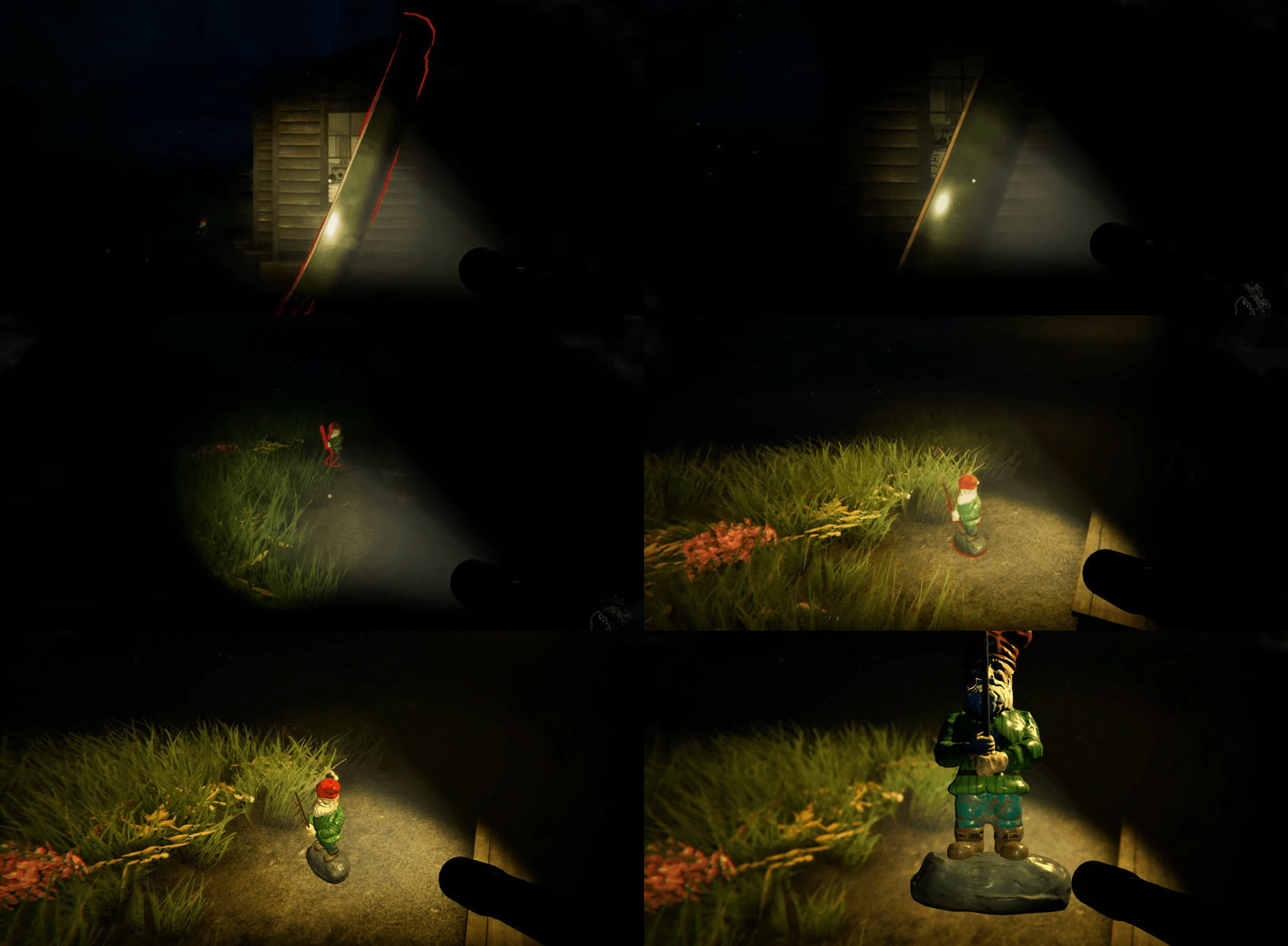 Outline effect as shipped in the game
During the development of Sanity of Morris I was tasked to create an outline effect for the game. The effect's goal was to communicate to the player which objects are interactive, like those used in many other games.
At the start I researched many different approaches for creating outlines like: vertex offsets, using the depth texture, using the normal GBuffer and using a stencil based effect.
After reviewing the options I decided to use the stencil technique as it produces the best results and is easy to grasp. This implementation, opposed to the vertex offset approach, doesn't cause issues with objects with sharp corners. Another reason to select this implementation is that, from a gameplay programmer perspective, this approach would be easier to author from their side. As I will explain later, this effect only requires the gameplay programmers to add one component to the root of an object to highlight, in order to active the effect. The final reason to choose this approach is that other developers / graphics programmers in the team might need to amend or change the effect later so I decided that a simple to understand effect was the way to go.
The way the effect works is quite simple. First, you create an empty black buffer where you render the objects' sub-meshes into with a flat white color without any shading. Then you blur a copy of the buffer in both directions ramping the pixel values back to black and white. This will give you a buffer with an expanded border. Then you subtract the old buffer from the blurred buffer and you will be left with the outline. Then you mix the outline texture with a color and apply it to the output buffer of the post-processing effect. This will mix the outline effect with the color buffer that will be rendered to the screen.
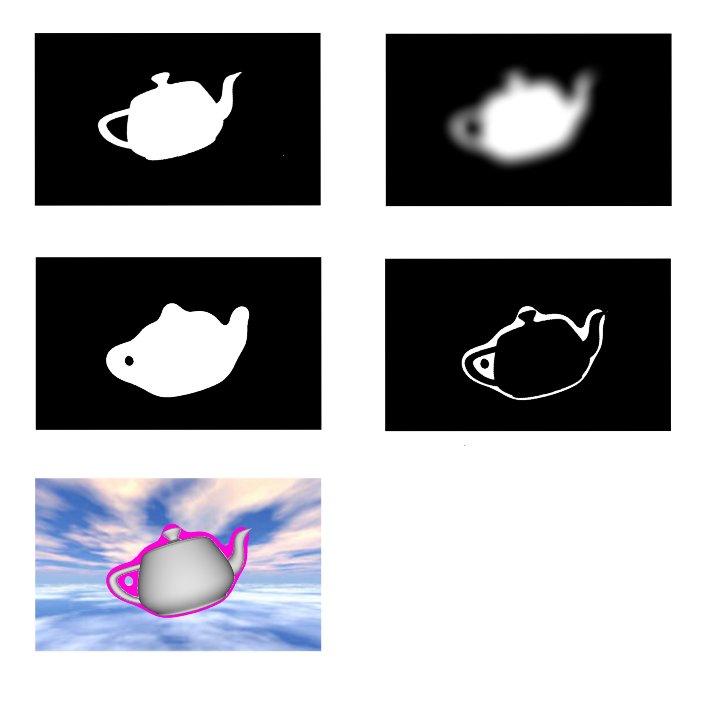 Visual explanation of the post processing outline effect.
How the outline effect is achieved in the engine and authored by gameplay programmers is quite simple. A post-processing effect class is added to a stack of post-processing effects. When the effect is enabled, it loops through a static list of registered 'outline' components. For each component the renderers are fetched and drawn with a 'Unlit White' shader to the first temporary render texture. Then the rest of the effect is completed as described in the previous section.
The outline components attached to GameObjects in the scene register themselves during a 'OnEnable' call and unregister themselves during a 'OnDisable' call at run time. The registration process is a simple add to a static list of the post-processing effect class and the unregister is a remove from the list. The user can then just enable or disable the component on the GameObject to enable or disable the outline being drawn through script or any other means.
Below is some pseudocode for both the outline component and the outline post-processing effects:
using UnityEngine;namespace PeterVerzijl.PostProcessing.Outline { [ExecuteAlways] public class OutlineComponent : MonoBehaviour { public void OnEnable() { OutlinePostProcessPass.RegisterOutlineComponent(this); } public void OnDisable() { OutlinePostProcessPass.UnregisterOutlineComponent(this); } }}
Outline Component to register renderers to Post-Processing effect.
using System;using System.Collections.Generic;using UnityEngine;using UnityEngine.Rendering;using UnityEngine.Rendering.Universal;namespace PeterVerzijl.PostProcessing.Outline { [Serializable, VolumeComponentMenuForRenderPipeline(CustomOutlineEffectComponent, typeof(UniversalRenderPipeline))] public class OutlineEffectComponent : VolumeComponent, IPostProcessComponent { public ColorParameter outlineColor = new ColorParameter(Color.red); public FloatParameter outlineSize = new FloatParameter(1); public bool IsActive() = this.active; public bool IsTileCompatible() = true; }}
Data component for setting and serializing outline settings.
using UnityEngine.Rendering.Universal;namespace PeterVerzijl.PostProcessing.Outline { [System.Serializable] public class OutlinePostProcessRenderer : ScriptableRendererFeature { private OutlinePostProcessPass pass; public override void Create() { pass = new OutlinePostProcessPass(); } public override void AddRenderPasses(ScriptableRenderer renderer, ref RenderingData renderignData) { renderer.EnqueuePass(pass); } }}
Outline Renderer class, simple passthrough for the custom pass.
using System.Collections.Generic;using UnityEngine;using UnityEngine.Rendering;using UnityEngine.Rendering.Universal;namespace PeterVerzijl.PostProcessing.Outline { [System.Serializable] public class OutlinePostProcessPass : ScriptableRenderPass { private static List<OutlineComponent> outlineComponents = new List<OutlineComponent>(); public static void RegisterOutlineComponent(OutlineComponent component) { if (!outlineComponents.Contains(component)) { outlineComponents.Add(component); } } public static void UnregisterOutlineComponent(OutlineComponent component) { outlineComponents.Remove(component); } private Material unlitWhiteMaterail; private Material outlineMaterail; private RenderTargetIdentifier sourceRTID; private RenderTargetIdentifier stencilRTID; private RenderTargetIdentifier blurTempRTID; private RenderTargetIdentifier blurredStencilRTID; readonly int stencilRTIdStencil = Shader.PropertyToID("_StencilRT"); readonly int blurTempRTIdStencil = Shader.PropertyToID("_BlurTemp"); readonly int blurredStencilRTIdStencil = Shader.PropertyToID("_blurredStencil"); public OutlinePostProcessPass() { this.renderPassEvent = RenderPassEvent.BeforeRenderingPostProcessing; } public override void OnCameraSetup(CommandBuffer cmd, ref RenderingData renderingData) { unlitWhiteMaterail = new Material(Shader.Find(HiddenCustomUnlitWhite)); outlineMaterail = new Material(Shader.Find(HiddenCustomOutline)); RenderTextureDescriptor rtDescriptor = renderingData.cameraData.cameraTargetDescriptor; rtDescriptor.depthBufferBits = 0; rtDescriptor.colorFormat = RenderTextureFormat.ARGB32; ScriptableRenderer renderer = renderingData.cameraData.renderer; sourceRTID = renderer.cameraColorTarget; cmd.GetTemporaryRT(stencilRTIdStencil, rtDescriptor, FilterMode.Bilinear); stencilRTID = new RenderTargetIdentifier(stencilRTIdStencil); cmd.GetTemporaryRT(blurTempRTIdStencil, rtDescriptor, FilterMode.Bilinear); blurTempRTID = new RenderTargetIdentifier(blurTempRTIdStencil); cmd.GetTemporaryRT(blurredStencilRTIdStencil, rtDescriptor, FilterMode.Bilinear); blurredStencilRTID = new RenderTargetIdentifier(blurredStencilRTIdStencil); } public override void Execute(ScriptableRenderContext context, ref RenderingData renderingData) { CommandBuffer cmd = CommandBufferPool.Get("Outline Post Processing"); cmd.Clear(); VolumeStack stack = VolumeManager.instance.stack; OutlineEffectComponent outlineEffectData = stack.GetComponent<OutlineEffectComponent>(); if (outlineEffectData.IsActive()) { outlineMaterail.SetColor(Shader.PropertyToID("_OutlineColor"), outlineEffectData.outlineColor.value); outlineMaterail.SetFloat(Shader.PropertyToID("_OutlineSize"), outlineEffectData.outlineSize.value); cmd.SetRenderTarget(blurredStencilRTID); cmd.ClearRenderTarget(RTClearFlags.All, Color.clear, 0, 0); cmd.SetRenderTarget(stencilRTID); cmd.ClearRenderTarget(RTClearFlags.All, Color.clear, 0, 0); // Draw all outline objects in white to the stencil buffer foreach (OutlineComponent outlineComponent in OutlinePostProcessPass.outlineComponents) { Renderer[] renderers = outlineComponent.GetComponentsInChildren<Renderer>(); foreach (Renderer renderer in renderers) { cmd.DrawRenderer(renderer, unlitWhiteMaterail); } } // Blur the stencil buffer cmd.Blit(stencilRTID, blurredStencilRTID, outlineMaterail, pass: 0); // Remove stencil from blurred buffer cmd.Blit(stencilRTID, blurredStencilRTID, outlineMaterail, pass: 1); cmd.Blit(blurredStencilRTID, sourceRTID, outlineMaterail, pass: 2); } context.ExecuteCommandBuffer(cmd); CommandBufferPool.Release(cmd); } public override void OnCameraCleanup(CommandBuffer cmd) { cmd.ReleaseTemporaryRT(stencilRTIdStencil); cmd.ReleaseTemporaryRT(blurTempRTIdStencil); cmd.ReleaseTemporaryRT(blurredStencilRTIdStencil); } }}
Actual implementation of the render passes. Execute is called every frame. Here the command buffer is filled with render commands.
Shader "Hidden/Custom/UnlitWhite"
{
	Properties
	{
	}
	SubShader
	{
		Tags { "RenderType"="Opaque" "RenderPipeline" = "UniversalPipeline" }

		Pass
		{
            HLSLPROGRAM
            #include Packagescom.unity.render-pipelines.universalShaderLibrarySurfaceInput.hlsl

			#pragma vertex vert
			#pragma fragment frag

            struct Attributes
            {
                float4 positionOS       : POSITION;
                float2 uv               : TEXCOORD0;
            };

            struct Varyings
            {
                float2 uv        : TEXCOORD0;
                float4 vertex : SV_POSITION;
                UNITY_VERTEX_OUTPUT_STEREO
            };


            Varyings vert(Attributes input)
            {
                Varyings output = (Varyings)0;
                UNITY_INITIALIZE_VERTEX_OUTPUT_STEREO(output);

                VertexPositionInputs vertexInput = GetVertexPositionInputs(input.positionOS.xyz);
                output.vertex = vertexInput.positionCS;
                output.uv = input.uv;

                return output;
            }

            float4 frag (Varyings input) : SV_Target
            {
                UNITY_SETUP_STEREO_EYE_INDEX_POST_VERTEX(input);
				return float4(1, 1, 1, 1);
            }

			ENDHLSL
		}
	}
	FallBack "Diffuse"
}
Super simple shader that outputs white for every fragment.
Shader "Hidden/Custom/Outline"
{
	Properties
	{
		_MainTex ("Main Texture", 2D) = "white" {}
	}
	SubShader
	{
		Tags { "RenderType"="Opaque" "RenderPipeline" = "UniversalPipeline" }

		Pass
		{
			Name "Blur"

			HLSLPROGRAM
			#include Packagescom.unity.render-pipelines.universalShaderLibrarySurfaceInput.hlsl

			#pragma vertex vert
			#pragma fragment frag

			TEXTURE2D(_MainTex);
			SAMPLER(sampler_MainTex);
			float4 _MainTex_TexelSize;

			float _OutlineSize;

			struct Attributes
			{
				float4 positionOS       : POSITION;
				float2 uv               : TEXCOORD0;
			};

			struct Varyings
			{
				float2 uv        : TEXCOORD0;
				float4 vertex : SV_POSITION;
				UNITY_VERTEX_OUTPUT_STEREO
			};


			Varyings vert(Attributes input)
			{
				Varyings output = (Varyings)0;
				UNITY_INITIALIZE_VERTEX_OUTPUT_STEREO(output);

				VertexPositionInputs vertexInput = GetVertexPositionInputs(input.positionOS.xyz);
				output.vertex = vertexInput.positionCS;
				output.uv = input.uv;

				return output;
			}

			float4 frag (Varyings input) : SV_Target
			{
				UNITY_SETUP_STEREO_EYE_INDEX_POST_VERTEX(input);

				float2 resolution = _MainTex_TexelSize.xy;
				float offset = _OutlineSize;
				float4 color = SAMPLE_TEXTURE2D(_MainTex, sampler_MainTex, input.uv);
				color += SAMPLE_TEXTURE2D(_MainTex, sampler_MainTex, input.uv + float2( offset,  offset) * resolution);
				color += SAMPLE_TEXTURE2D(_MainTex, sampler_MainTex, input.uv + float2(-offset,  offset) * resolution);
				color += SAMPLE_TEXTURE2D(_MainTex, sampler_MainTex, input.uv + float2( offset, -offset) * resolution);
				color += SAMPLE_TEXTURE2D(_MainTex, sampler_MainTex, input.uv + float2(-offset, -offset) * resolution);
				color.rgb = 5.0f;

				color.rgb = ceil(color.rgb);

				return color;
			}

			ENDHLSL
		}

		Pass
		{
			Name "Subtract"

			BlendOp RevSub
			Blend One One

			HLSLPROGRAM
			#include Packagescom.unity.render-pipelines.universalShaderLibrarySurfaceInput.hlsl

			#pragma vertex vert
			#pragma fragment frag

			TEXTURE2D(_MainTex);
			SAMPLER(sampler_MainTex);
			float4 _MainTex_TexelSize;

			struct Attributes
			{
				float4 positionOS       : POSITION;
				float2 uv               : TEXCOORD0;
			};

			struct Varyings
			{
				float2 uv        : TEXCOORD0;
				float4 vertex : SV_POSITION;
				UNITY_VERTEX_OUTPUT_STEREO
			};


			Varyings vert(Attributes input)
			{
				Varyings output = (Varyings)0;
				UNITY_INITIALIZE_VERTEX_OUTPUT_STEREO(output);

				VertexPositionInputs vertexInput = GetVertexPositionInputs(input.positionOS.xyz);
				output.vertex = vertexInput.positionCS;
				output.uv = input.uv;

				return output;
			}

			float4 frag (Varyings input) : SV_Target
			{
				UNITY_SETUP_STEREO_EYE_INDEX_POST_VERTEX(input);

				float4 color = SAMPLE_TEXTURE2D(_MainTex, sampler_MainTex, input.uv);
				return color;
			}

			ENDHLSL
		}

		Pass
		{
			Name "Copy & Apply Color"

			Blend SrcAlpha OneSrcAlpha

			HLSLPROGRAM
			#include Packagescom.unity.render-pipelines.universalShaderLibrarySurfaceInput.hlsl

			#pragma vertex vert
			#pragma fragment frag

			TEXTURE2D(_MainTex);
			SAMPLER(sampler_MainTex);
			float4 _MainTex_TexelSize;

			float4 _OutlineColor;

			struct Attributes
			{
				float4 positionOS       : POSITION;
				float2 uv               : TEXCOORD0;
			};

			struct Varyings
			{
				float2 uv        : TEXCOORD0;
				float4 vertex : SV_POSITION;
				UNITY_VERTEX_OUTPUT_STEREO
			};


			Varyings vert(Attributes input)
			{
				Varyings output = (Varyings)0;
				UNITY_INITIALIZE_VERTEX_OUTPUT_STEREO(output);

				VertexPositionInputs vertexInput = GetVertexPositionInputs(input.positionOS.xyz);
				output.vertex = vertexInput.positionCS;
				output.uv = input.uv;

				return output;
			}

			float4 frag (Varyings input) : SV_Target
			{
				UNITY_SETUP_STEREO_EYE_INDEX_POST_VERTEX(input);

				float4 color = SAMPLE_TEXTURE2D(_MainTex, sampler_MainTex, input.uv);
				return color * _OutlineColor;
			}

			ENDHLSL
		}
	}
	FallBack "Diffuse"
}
Outline shader passes. First pass used for blurring the stencil buffer. Second pass for subtracting the stencil from the blurred result. Third pass for blending the final subtracted result with the output buffer.